Results and Exports#
Every accepted submission can be stored, inspected, exported, e-mailed and
forwarded. The Results view (@@results) is the hub for all of this;
the underlying operations are also available as endpoints (see
Endpoints) and are protected by the permission model described in
Security.
How results are stored#
A submission is persisted when the survey’s store action is enabled
(otherwise it is processed — mailed, POSTed — and discarded). Each stored
entry carries:
poll_id— a UUID identifying the submission (also used in mail subjects, POST payloads and exports).created— submission timestamp (UTC, ISO 8601 in exports).user— the submitting user id (empty for anonymous visitors).form_version— the id of the form version that was submitted against.result— the submission payload (the answers, as sent by the browser).seq_no— a per-survey sequence number, useful for referencing submissions to third parties.site_id— the Plone site id, stored in both backends so that results of multiple sites can be told apart (relevant for multi-site deployments and SQL reporting).
Storage backends#
The backend is chosen globally under Site Setup > Forms → Storage (see Global options):
ZODB (default) — results live in annotations on the survey object, inside Plone’s object database. No external infrastructure.
RDBMS — results are written to a relational database via SQLModel (SQLite, PostgreSQL, MySQL). The
database_uriis a SQLAlchemy-style URI; thesite_idcolumn is indexed. This backend is the basis for cross-site SQL reporting.
The Results view shows which backend is in use; database URIs are masked
(passwords appear as ****).
The Results view (@@results)#
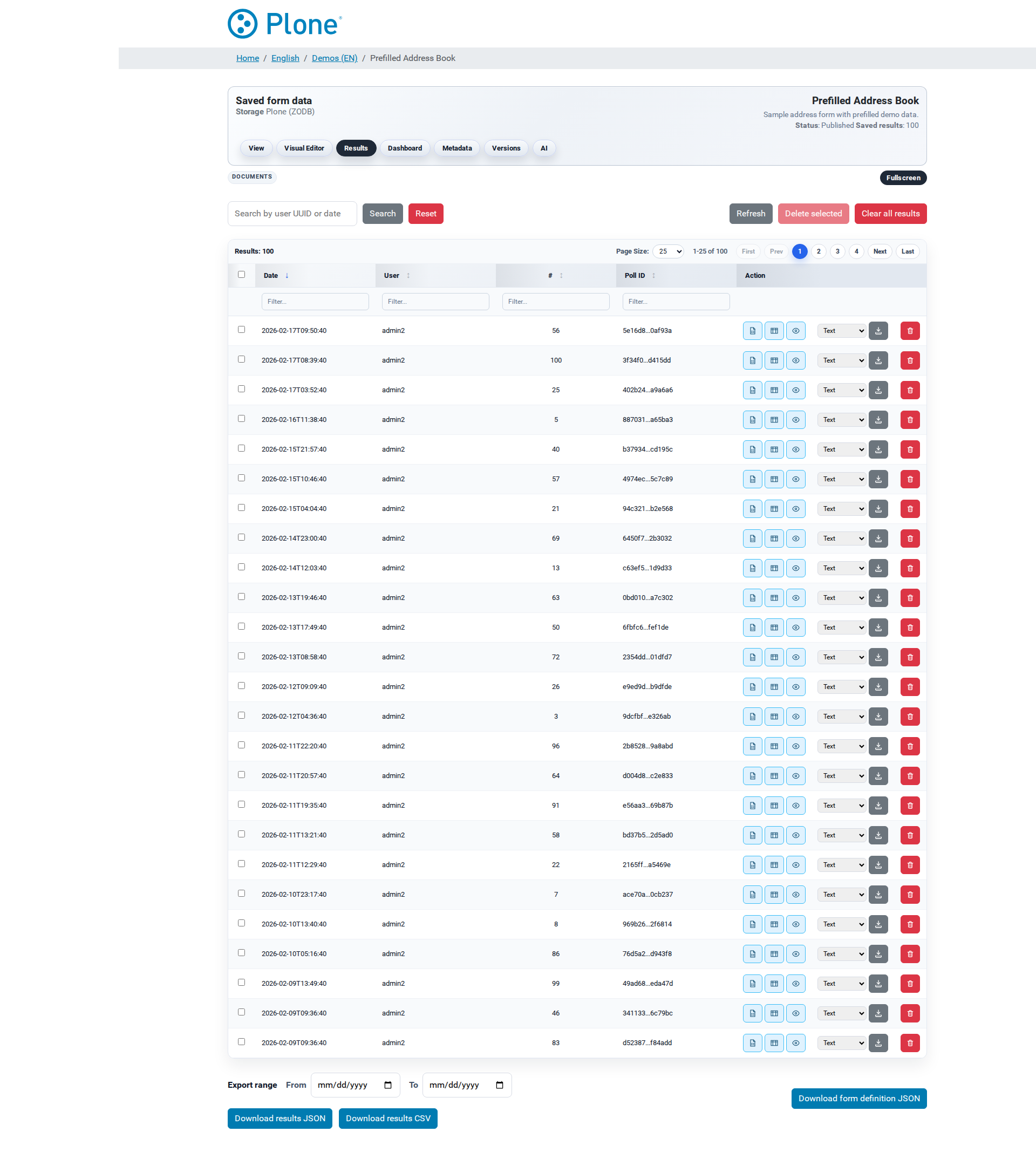
@@results requires cmf.ModifyPortalContent. It renders a
Tabulator-driven grid fed by the @@results-data endpoint (remote
pagination, sorting and filtering).
Toolbar
Search — free-text search across user, UUID, poll id and creation date; Reset and Refresh buttons.
Delete selected — batch deletion of the selected rows (Manager only).
Clear all results — removes every stored submission; the UI requires typing
clearinto the confirmation dialog.
Grid
Columns: date, user, sequence number, poll id and per-row action buttons. Row selection is available to Managers.
Per-row actions
JSON — opens the raw submission payload in a modal (
@@view-result-json?poll_id=…).Table — renders the payload as a readable table; field labels are taken from the current form schema; matrix and dynamic-matrix answers are rendered as nested tables.
Details — the full HTML detail page (
@@result-detail).Download — exports the single submission in a selectable format (
@@download-result).Mail — only shown when the survey has the
mailaction: e-mails the submission as an export attachment (@@mail-result).POST — only shown when the survey has the
postaction and an endpoint: forwards the submission to the endpoint (@@post-result).Delete — single-row deletion (Manager only).
Footer downloads
Download results (JSON) — all submissions with metadata (
@@download-polls-json).Download results (CSV) — all submissions as a spreadsheet-friendly table (
@@download-polls-csv).Download form definition (JSON) — the latest form version (
@@download-form-json).
If the survey has no store action, a banner explains that results are
not persisted and the grid stays empty.
Export formats#
Nine export formats are available (per submission via
@@download-result, as mail attachments, and in the converters):
Format |
Extension |
Content type |
|---|---|---|
Text |
|
|
Markdown |
|
|
HTML |
|
|
|
|
|
CSV |
|
|
Excel |
|
|
XML |
|
|
Word |
|
|
JSON |
|
|
Conversion pipeline#
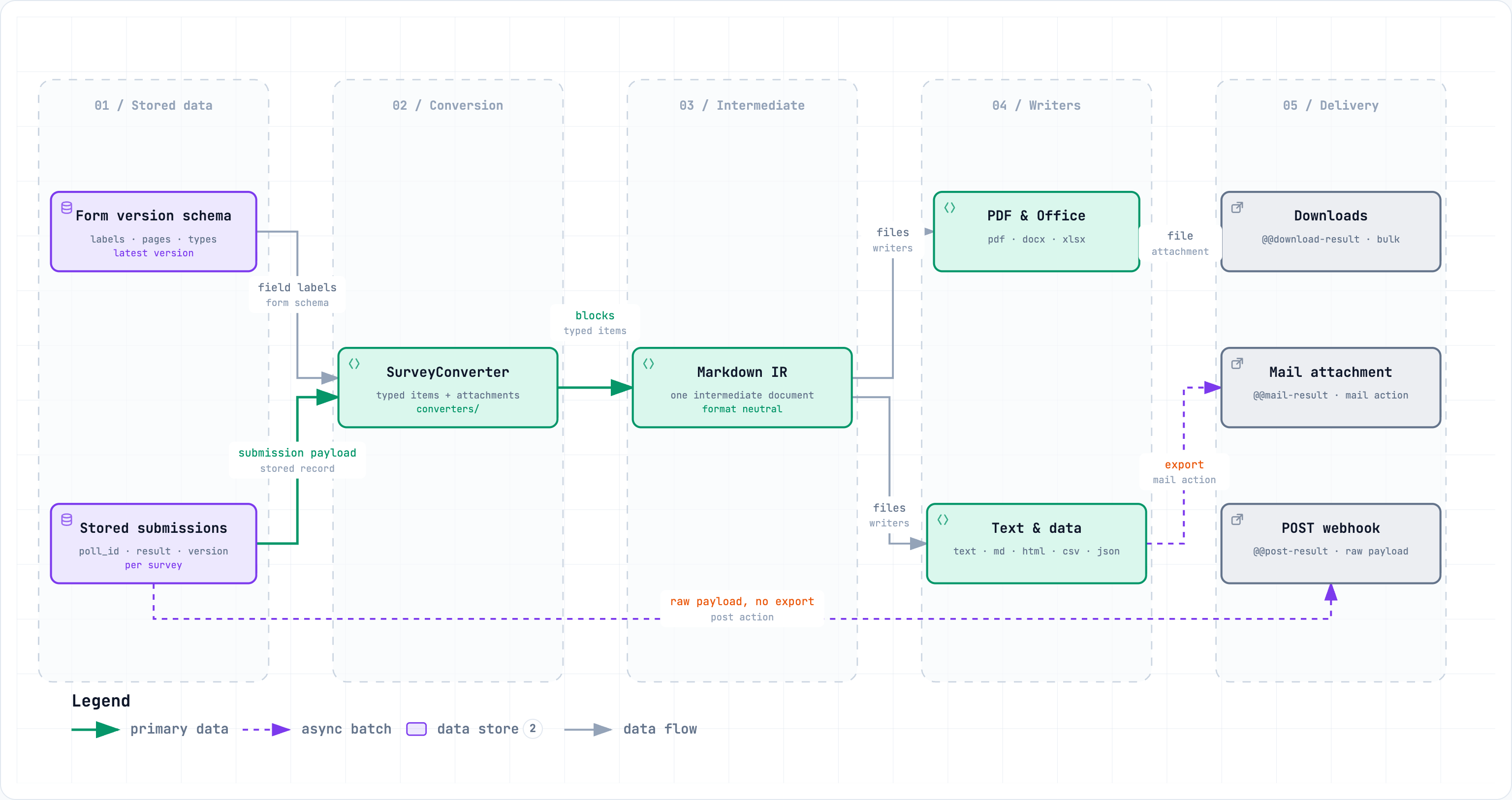
All conversions run server-side through the converter framework
(converters/). The stored payload and the form schema are fed to a
SurveyConverter which collects typed items and attachments (uploaded
files are embedded into the exports where the format supports it). The
pipeline produces a Markdown intermediate representation, from which the
format-specific writers (HTML/PDF/Word/Excel/…) generate the final file.
Attachments from file-upload questions are saved alongside and referenced
by the exports.
Exporting results#
Single submission
@@download-result?poll_id=<id>&format=<format> (GET,
cmf.ModifyPortalContent) downloads one submission in the requested
format; the response carries a Content-Disposition: attachment header
with a descriptive filename.
Bulk exports
@@download-polls-json— every stored submission with its metadata (poll_id,created,user,form_version) as<survey>-survey-data.json. Supports an optional date range via thefromandtoparameters (dates parsed flexibly, e.g.2026-08-01).@@download-polls-csv— the same data as CSV. The header starts withpoll_id,user,created,form_versionand continues with one column per answer field. Field names are discovered across all submissions (a stable header is computed first); list/dict values are serialized as JSON inside the cell. Samefrom/todate filter.@@download-form-json— the current form schema, independent of the results (useful to archive the form alongside the data).
The bulk JSON export is the recommended machine-readable format; the CSV export is meant for spreadsheet analysis.
Result detail view#
@@result-detail?poll_id=… renders a submission as a human-readable HTML
page: every answer is mapped back to its question label via the current
form schema, the submission timestamp and submitting user are shown, and
the available export formats are offered for download. Matrix questions
render as tables; uploaded files are linked. The same data is available as
raw JSON through @@view-result-json.
Mail exports#
@@mail-result (POST, cmf.ModifyPortalContent) e-mails a single
submission in a chosen format (parameters poll_id and format). The
recipients, subject and body come from the survey’s Mail settings, falling
back to the global Mail defaults (per-survey settings win — see
Survey options and Global options).
Recipient:
email_to(single address; CC/BCC lists are honored).Subject: may contain
{poll_id}.Body: supports
{created},{creator}and{formats}(the label of the exported format).The generated export is attached; file uploads from the submission are attached as well.
The action requires a configured recipient and subject; errors are reported in the UI and the operation is aborted without sending.
POST exports#
@@post-result (POST, cmf.ModifyPortalContent) re-forwards a single
stored submission to the survey’s configured POST endpoint
(post_endpoint_url). The payload has the same shape as the automatic
post action on submission:
{
  "poll": { ...submission fields..., "poll_id": "…", "created": "…" },
  "form": { ...latest survey JSON schema... },
  "survey_url": "https://example.org/demo/my-survey"
}
The request uses a 10 second timeout; failures are logged and reported in the UI.
Deleting results#
@@delete-results(POST, Manager only — enforced inside the view) deletes one or more submissions. Accepts a JSON body{"poll_ids": [...]}or the form fieldspoll_id/poll_ids. Returns the deletion result as JSON.@@clear-results(POST,cmf.ModifyPortalContent) removes all stored submissions of the survey and redirects to the survey view. The UI requires theclearconfirmation; there is no undo.
Dashboard#
@@dashboard (cmf.ModifyPortalContent) is a statistics screen for
the survey’s submissions (rendered with dashboard.js/dashboard.css).
It complements the results grid with an at-a-glance view of the collected
data. The feature can be hidden site-wide via the “Features enabled”
setting (dashboard).
PDF generator#
@@pdf-generator (cmf.ManagePortal) is a SurveyJS-based screen for
generating PDF artifacts from a survey (feature-gated by the
pdf-generator flag in “Features enabled”). It builds on the SurveyJS
PDF export capabilities and the fillable-PDF tooling; see
Global options for the feature switches and Survey options
for the PDF-related survey fields (PDF Form / Fillable PDF).
Monitoring#
For a site-wide view across all surveys, @@survey-monitor (site root,
cmf.ManagePortal) provides a monitoring dashboard with real-time
statistics and graphs of survey submission rates.
Operational notes#
Results are per survey; the storage backend is global.
seq_novalues are per survey and monotonically increasing — they are stable references for cross-referencing with external systems.Date filters accept human-friendly values; the parsing tolerates partial dates and timezones.
All export and deletion endpoints require the editor role or Manager; the destructive actions are additionally Manager-gated in the UI and in the view code. See Security for the full model.