Installation#
This package is a Plone add-on. Installing it has two parts: setting up the
package in a Buildout-based Plone project, and — optionally — building the
external survey validator binary. The toolchain is managed with uv; the
Plone instance itself is still assembled by Buildout.
Prerequisites#
Plone 6.2 — the version covered by the CI test suite (the test configuration
test_plone60.cfgextends the Plone 6.2.x buildout test config). Plone 6.1 is not exercised by CI and therefore not advertised as supported. Plone 5.2 and its buildout configuration are gone.Python 3.12, 3.13 or 3.14 — downloaded and managed automatically by
uv. The Plone test suite runs on 3.14; the Plone-free test subset (converters, schema, validator wrapper) runs on all three versions in CI.Latest ``uv`` (see https://docs.astral.sh/uv/; the CI pins it via the
astral-sh/setup-uvaction withversion: latest)A Buildout-based Plone project
The Python runtime dependencies — including
privacyforms.aiandprivacyforms.pdf, which the AI generator and the fillable-PDF features need — are declared in the package metadata and installed with the add-on. PDF filling additionally requires the optional extrazopyx.surveyjs[pdf](PyMuPDF, dual-licensed AGPL-3.0 or commercial); without it the filled-PDF download is refused with an error message.Only for the optional validator build:
bunordenoon the PATH (the add-on can also fetch Deno itself, see below)
Setup with uv (recommended)#
The repository is set up with uv-managed virtual environments; the same
recipe works for a fresh checkout and for the development instance:
# 1. Create the virtual environment in the repository root
uv venv --clear

# 2. Install the pinned toolchain (zc.buildout 5.2, setuptools, …)
uv pip install -r requirements.txt

# 3. Run buildout — generates bin/instance, bin/test, bin/zopepy, …
.venv/bin/buildout

# 4. Start Plone
./bin/instance fg          # foreground
# or: ./bin/instance start # background
# or: ./bin/instance stop
The development site root is http://localhost:8082/demo; log in with
forms / formsarecool (Editor role) or the admin account from the
buildout configuration.
Why uv?
uv pip installis dramatically faster than classic pip and uses a shared content-addressed cache.requirements.txtpins the buildout toolchain (zc.buildout==5.2.0,setuptools==81.0.0, …), so buildout runs in a reproducible environment regardless of the system Python.The same uv-managed environment is used by the Makefile targets (
make test,make docs,make sdist).
Buildout#
Classic buildout installation of the add-on itself:
Add
zopyx.surveyjsto your buildout eggs and rerun buildout.[buildout] eggs += zopyx.surveyjs
Restart Plone and install the add-on in the Add-ons control panel.
The buildout generates the usual scripts:
bin/instance(Plone),bin/test(Plone test runner) andbin/zopepy(Python interpreter with the Zope environment). The Makefile’smake testruns the test suite through these scripts with coverage.
Verifying the installation#
Run the test suite to confirm everything is wired up correctly:
make test
Demo content profile (optional)#
The add-on ships a second GenericSetup profile, zopyx.surveyjs:demo, that
seeds a ready-to-explore demo setup on an existing site. It is an
extension profile, so install the regular add-on first. It is not a separate
entry in the Add-ons control panel; apply it through GenericSetup, either from
the ZMI (portal_setup → Import → select zopyx.surveyjs:demo) or with
a script:
from plone import api

setup = api.portal.get_tool("portal_setup")
setup.runAllImportStepsFromProfile("profile-zopyx.surveyjs:demo")
The profile is idempotent — re-running it never duplicates themes, forms or form versions — and it creates:
the four SurveyJS theme presets that
scripts/init_plone.pyseeds as well:light,dark,light-no-panelsanddark-no-panels(existing themes with one of these names are left untouched), anda published folder
demo-formswith three complex English example forms, each covering a different scope and each using a different theme:Form (id)
Scope
Theme
Employee Onboarding (
employee-onboarding)HR onboarding intake: personal data, employment terms, IT provisioning, emergency contacts, policies, signature
lightCustomer Satisfaction Survey (
customer-satisfaction)Product and support satisfaction: usage profile, ratings, matrices, conditional support questions, improvement ranking, renewal intent
darkConference Registration (
conference-registration)Event registration: attendee data, tickets with calculated totals, payment/billing, session booking, group attendees, dietary and accessibility requirements
light-no-panels
All three forms are stored with Store as submission action and are
published, so they can be filled in anonymously. Applying the profile again
after a package upgrade refreshes the shipped form definitions: a form gets a
new version only when its definition actually changed.
This profile is also the example content of the add-on’s site distribution, see Site distribution for creating a new site that already contains it.
External survey validation (deno / bun)#
The optional “Force Server Side Validation” feature (per-survey setting,
default on) runs every submission through an external validator binary. The
validator is a single compiled executable built from
validate.mjs (SurveyJS schema checks against survey-core 3.x), so no
Node.js runtime is needed on the Plone host.
Source layout
The validator lives in src/zopyx/surveyjs/data_validation/:
validate.mjs— the validation script (ESM, importssurvey-core).package.json/bun.lock— thesurvey-core@3.0.4dependency (npm validate/bun validate.mjsrun the script directly).deno_build.py— self-contained build script (downloads the pinned Deno release and verifies its SHA256 digest and reported version). The pinned Deno version and SHA256 digests for the supported macOS/Linux x86_64 and arm64 artifacts are maintained indeno_build.py.validate_data.py— the Python wrapper that locates and invokes the binary at submission time.validate-linux/validate-mac— the runtime binaries the wrapper expects (next to the module).
Runtime auto-build (no manual step)
If the binary is missing — or was built from a different validate.mjs or
toolchain pin — the wrapper builds it
automatically: deno_build.py downloads the pinned Deno release from
GitHub, verifies the archive SHA256 digest, verifies deno --version, and
then compiles validate.mjs with an import map
(npm:survey-core@3.0.4) and writes validate-linux (or
validate-mac) next to the module. No Deno installation is required on
the Plone host for this path — the script fetches it into a temporary
directory.
The compile passes --minimum-dependency-age=0: Deno 2.9 and newer
otherwise refuse to resolve a package release published less than 24 hours
ago, which would block every deliberate survey-core pin bump for a day.
The exact pin and the pinned, checksum-verified Deno toolchain remain the
supply-chain boundary.
Manual build with bun (recommended for packaging)
Bun produces smaller, self-contained binaries and is the default in the included Makefile:
cd src/zopyx/surveyjs/data_validation
bun install                                   # fetch survey-core
bun build --compile --target=bun-linux-x64 \
    --outfile dist/survey-validate-linux validate.mjs
# macOS:
bun build --compile --target=bun-darwin-x64 \
    --outfile dist/survey-validate-macos validate.mjs

# or simply: make all   (bun install + both targets)
Manual build with deno
cd src/zopyx/surveyjs/data_validation
deno install
deno compile --allow-read --allow-write --minimum-dependency-age=0 \
    --no-check --node-modules-dir=auto \
    --target=x86_64-unknown-linux-gnu \
    --output dist/survey-validate-linux-deno validate.mjs

# or simply: make deno  (both macOS and Linux targets)
Cross-compilation
Building a macOS binary from a Linux host (or vice versa) works through the Docker targets in the Makefile:
make docker-linux        # survey-validate-deno:linux image
make docker-mac-extract  # build macOS binary and copy it out of the image
Deploying the binary
The dist/ directory is for packaging/distribution. At runtime the
wrapper looks for the binary next to the module
(data_validation/validate-linux on Linux); copy the freshly built
binary there (or let the auto-build path create it) so server-side
validation is active. Rebuilds are deterministic: the build records a
manifest (validate-linux.meta.json) with the validate.mjs source
hash and the pinned toolchain, and the binary is rebuilt only when those
inputs change — never on a calendar schedule — so the Plone host needs
no build-time network access during submission handling. Before each
run the wrapper verifies the binary’s SHA-256 against its provenance
digest (validate-linux.sha256), cached once per day; a corrupted or
tampered binary is refused (fail-closed). The validator child runs with
core dumps disabled; memory runaway is contained by subprocess isolation
(a validator OOM kills only the child) and the 30-second validation
timeout. The
downloaded Deno executable is never used unless both its archive digest and
reported version match the pins in deno_build.py. Windows is not currently
supported by the runtime wrapper.
Optional components#
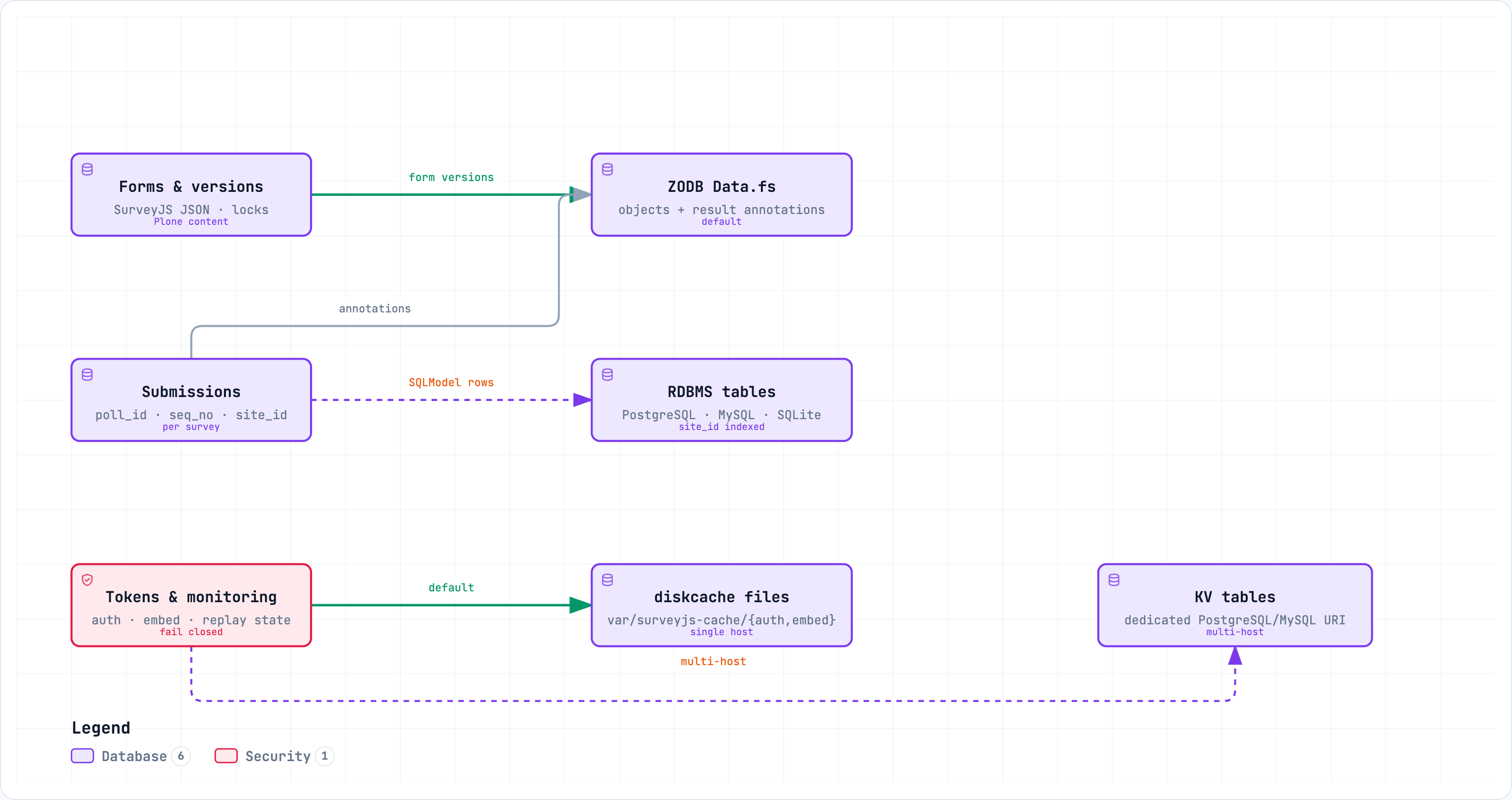
Three data domains, three separate decisions: form versions always stay in
Plone content, submissions use one globally configured backend, and the token
and monitoring cache has its own switch — local diskcache files on a single
host, a dedicated KV database URI when several hosts must agree.
- Relational result storage
The SQLModel backend supports SQLite, PostgreSQL, and MySQL. Ensure the configured database URI is reachable by the Plone process (default:
sqlite:///var/surveyjs-results.db). Each row stores the Plonesite_idto support multi-site deployments. Configure it under Site Setup > Forms → Storage.- KV cache backend
The KV facade used by authenticity tokens, Direct DOM embed tokens and monitoring is configured separately under Site Setup > Forms → Storage. The default is
diskcachewith caches below$INSTANCE_HOME/var/surveyjs-cache/{auth,embed,monitoring}. Relative paths are resolved againstINSTANCE_HOMErather than the process working directory. For multiple application servers, selectrdbmsand configurekv_cache_database_uriwith a PostgreSQL or MySQL SQLAlchemy URI. A dedicated KV URI is required; the resultdatabase_uriis not used implicitly. SeeDISKCACHE.mdfor the deployment topology, namespace and backend-switch implications.- SurveyJS license and AI parameters
The SurveyJS license key and the AI model/API key are injected while the site is built — from a key file or 1Password (local development) or from GitHub secrets (CI/CD Docker build). See License Key and AI Parameters.
- AI Generator
The AI Generator uses the Python
llmpackage plus theprivacyforms_aihelper and supports installed, Ollama and custom OpenAI-compatible providers. See AI Generator and Global options.
Source code#
The project consists of three repositories under the zopyx GitHub
organisation. The Plone add-on depends on the two Python packages for its
AI and PDF features:
Repository |
Purpose |
|---|---|
This add-on: the Plone 6 + SurveyJS integration (forms, results, AI generator, chatbot, PDF generator, embedding). |
|
Python helpers and CLI on top of the |
|
Python library for parsing and filling PDF forms (pypdf-based);
powers the fillable-PDF import and PDF filling features. PyPI
package: |
In this repository’s buildout the two packages are installed as develop
eggs from the sibling checkouts under src/ (src/privacyforms.ai,
src/privacyforms.pdf). Issues and contributions are handled in the
respective repository.
Development workflow#
make test— Plone test runner (bin/test -s zopyx.surveyjs) plus converter tests with coverage.make docs— builds this documentation with Sphinx in an ephemeraluvenvironment (no persistent venv needed).make sdist— builds the source distribution viauv run python setup.py sdist.