Actions#
Actions define what happens when a survey submission is accepted. They are
configured per survey in the Actions fieldset (see Survey options)
as a multi-select: any combination of store, mail,
mail-notification and post can be active at the same time, and every
selected action runs for each accepted submission — actions are independent,
not alternatives.
The submission lifecycle is: receive → harden → validate → act → answer. All hardening (payload size), access control (tokens) and validation steps run before any action, and actions never change the outcome of the submission: a mail or POST failure is logged but the submission itself stays accepted.
Action types#
store — persist the submission#
The foundation of the results feature: saves the submission in the results
store (ZODB or RDBMS, see Global options), where it appears in
@@results and is available for exports, detail views, mail and POST
re-forwarding. The field is mandatory (at least one action must be selected)
and defaults to store.
Details:
The stored record contains
poll_id,created,user,form_version, the answer payload, a per-surveyseq_noand thesite_id.When the global Log IP addresses / Log user agent settings are enabled, the client IP and user-agent string are stored alongside the submission (privacy-relevant — see Global options).
If
storeis disabled, the submission is processed by the other actions and the response reports"stored": false— the data is not kept.
mail — e-mail exported results#
Generates export files in the configured formats and sends them as e-mail attachments. Requires a configured recipient and subject; the settings come from the survey’s Mail fieldset, falling back to the global Mail defaults (per-survey wins).
Details:
Formats: the Mail Formats selection (see Survey options). If no format is selected, PDF is used as the default. A selected Markdown format is silently replaced by PDF (Markdown is not attached).
Required settings:
email_toandemail_subjectmust be set; otherwise the mail is skipped with a log entry (the submission is still accepted).Body placeholders:
{created}(submission timestamp),{creator}(submitting user),{formats}(labels of the attached formats).Attachments: the generated exports and any files uploaded in the submission (file-upload questions) are attached.
Failure isolation: a rendering, conversion or mail error is logged and swallowed — a broken mail setup never fails the submission or blocks the other actions.
mail-notification — notification e-mail#
Sends a lightweight notification e-mail without result attachments, pointing to the submission detail view. Configured in the survey’s Mail notifications fieldset (subject and body templates, see Survey options).
Details:
Placeholders:
{title}(survey title),{detail_url}(link to the submission detail page),{poll_id}.Like
mail, it is independent of the other actions and its failures are logged without failing the submission.
post — forward to an HTTP endpoint#
Forwards the submission payload to an external HTTP(S) endpoint — the webhook-style integration. Only executed when the survey has a POST endpoint URL configured; otherwise it is skipped with a log message.
The payload mirrors the stored submission plus context for downstream processing:
{
  "poll": { ...submission fields..., "poll_id": "…", "created": "…" },
  "form": { ...latest survey JSON schema... },
  "survey_url": "https://example.org/demo/my-survey"
}
Details:
The request uses a 10 second timeout; non-2xx responses and connection errors are logged (including the poll id and endpoint).
A failure never blocks the submission — pair
postwithstoreto keep a local copy when the downstream system is unavailable.The same payload shape is used by the manual re-forward action
@@post-resultin the results view (see Results and Exports).
Execution flow#
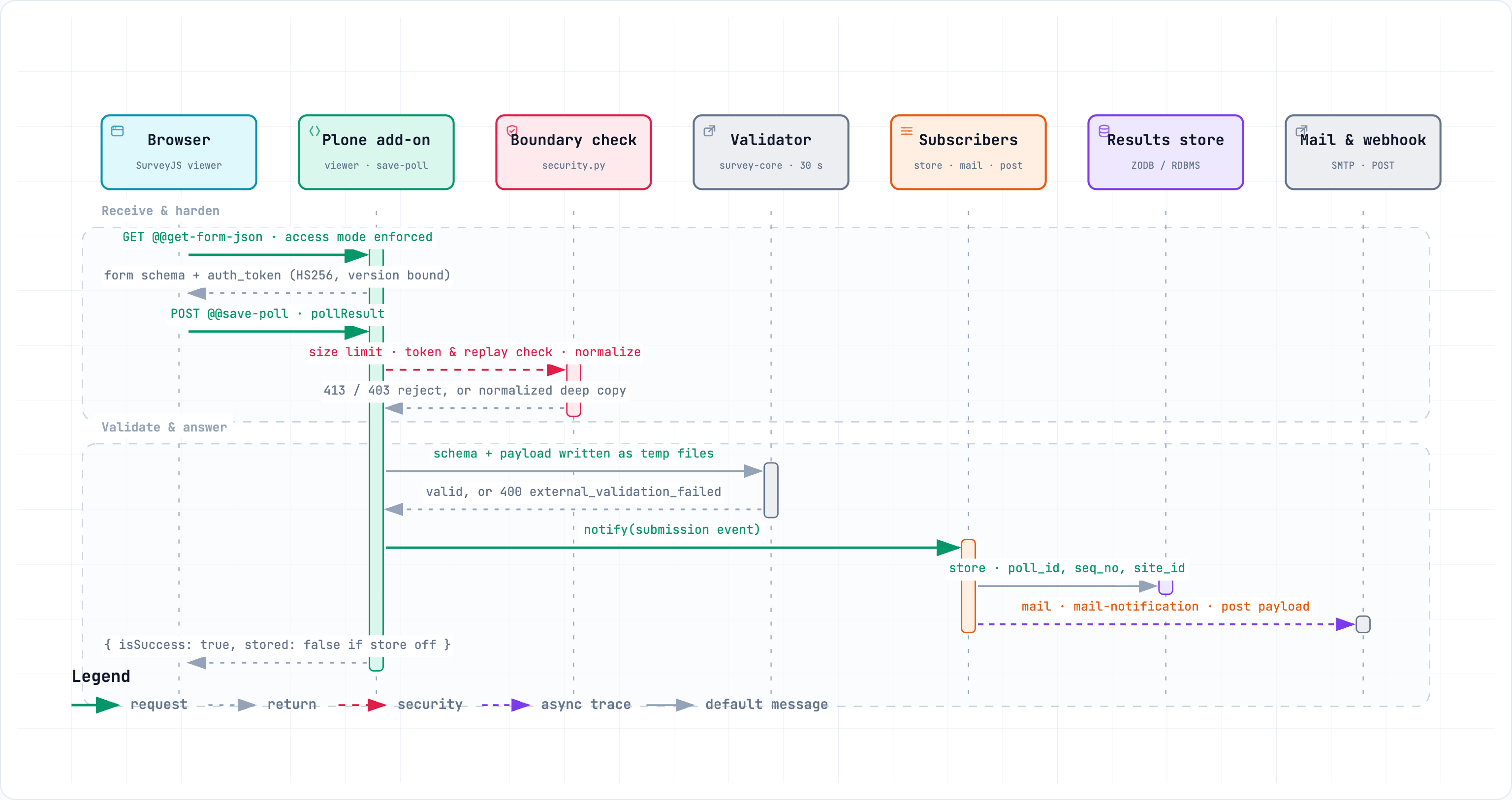
``@@save-poll`` receives the submission (form field
pollResult) and applies the hardening checks: payload size limit (HTTP 413 for oversized bodies), access mode and authenticity token (see Security).Server-side validation runs when the survey’s Force Server Side Validation is enabled: the external validator binary checks the payload against the form schema; a failed validation rejects the submission (HTTP 400 with error details) before any action runs.
A submission event is emitted with the payload and metadata (
poll_id,created,user,form_version).Subscribers execute the enabled actions — each subscriber is responsible for exactly one side effect (store, mail, mail-notification, post). They run synchronously in the request; failures are logged and do not raise into the caller.
The response is returned:
{"isSuccess": true}— plus"stored": falsewhen thestoreaction is not enabled.
Error handling#
Hardening and validation errors (400/403/413) happen before the actions and reject the submission.
Action failures (mail host down, export conversion error, POST endpoint unreachable) are logged with the poll id and never fail the submission — the caller receives a success response.
The automatic
postaction only fires when an endpoint is configured; the manual@@post-resultreports endpoint errors in the UI.
Operational notes#
Combine
store+postfor a durable local copy plus webhook delivery; combinestore+mailto e-mail every submission to a reviewer.mail-notificationis the cheap alternative tomailwhen only a “something was submitted” signal is needed — no attachments, no export rendering.Mail and POST settings are validated lazily: incomplete configuration is logged, not surfaced to the visitor. Check the Plone logs if an expected mail or webhook does not arrive.
The order of actions in the response is fixed (store first, then mail, then notification, then post) but irrelevant in practice — the actions are independent.