Storage Backends#
SurveyJS submissions are stored through one of two result-storage backends:
ZODB — Plone’s object database, stored with the survey object.
RDBMS — a relational database accessed through SQLAlchemy/SQLModel.
The storage backend is configured globally in Site Setup > Forms > Storage. It applies to survey results and the access-token store.
Note
The default backend is currently zodb. The default database URI
shown for the relational backend is sqlite:///var/surveyjs-results.db;
selecting the SQLite URI does not activate relational storage by itself.
Select rdbms as the backend as well.
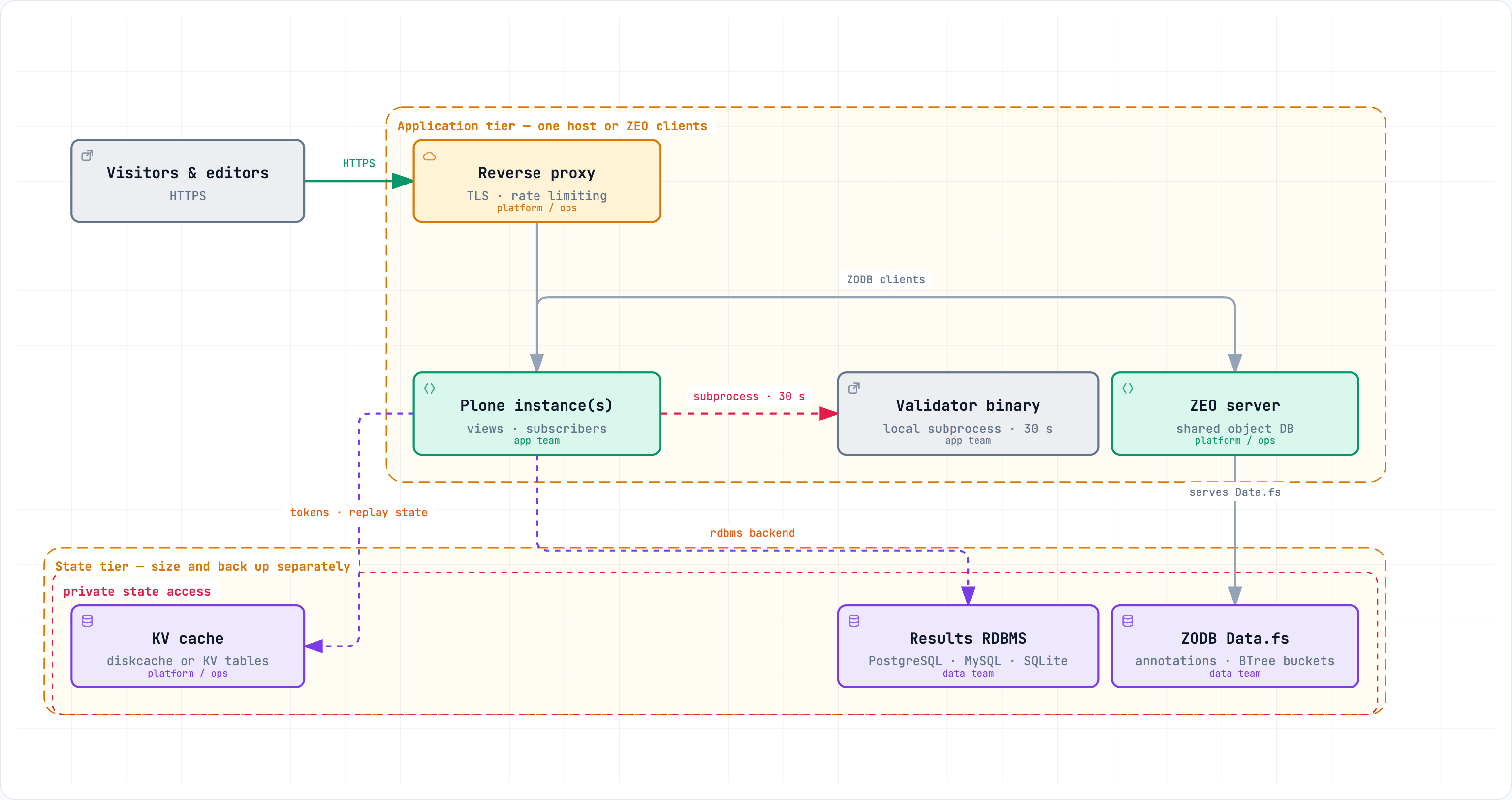
The picture names the pieces that must survive a restart and a redeploy: the results backend is either ZODB (annotations, the default) or the relational store, the KV cache holds authenticity/embed tokens and replay state, and the validator runs as a local subprocess on the application host.
Choosing a backend#
ZODB#
ZODB requires no external database service and is convenient for development, small installations, and forms with a low submission rate. Results are kept in annotations on the survey object.
ZODB uses optimistic concurrency. Concurrent requests that update the same
object can produce ConflictError exceptions. Submission bursts and several
workers writing the same survey therefore increase conflicts and retries. For
that reason, ZODB is suitable for polls and forms with low utilization, but
is not the preferred backend for high-rate or heavily concurrent forms.
This is not a theoretical concern: load testing observed the first ZODB conflicts at only five concurrent users, capping the single-instance write path well below 20 submissions/s (see Load testing).
ZEO setup#
ZEO allows multiple Plone processes to share a ZODB, but it does not make the ZODB write path a good fit for heavily concurrent result storage. In a ZEO deployment, multiple client processes may need to write submissions at the same time, and updates to shared survey or result objects can consequently cause conflicts and retries. For forms or polls with high submission volume, an RDBMS backend—preferably PostgreSQL or MySQL—is recommended instead.
SQLite with concurrent ZEO processes#
Combining the rdbms backend with SQLite and a multi-process ZEO
deployment adds further constraints:
All client processes share a single database file. It must be reachable by every process on a local filesystem: SQLite does not support reliable concurrent access over network filesystems (NFS, SMB). Never place the SQLite database on an NFS share.
SQLite allows only one writer at a time. WAL mode (enabled by this package, together with a five-second busy timeout) lets reads proceed while a write is in progress, but concurrent writes from several client processes still serialize on the write lock. Under sustained contention, once the busy timeout expires, submissions fail with
database is lockederrors.Each Zope client process keeps its own connection pool. Write bursts from one process directly extend the lock wait time of all others; failures appear abruptly once the timeout is exhausted rather than degrading smoothly.
SQLite in a ZEO deployment is therefore acceptable only for low-volume forms and polls. Large-scale deployments, high-rate forms and polls, several concurrent workers, or multiple application hosts should use PostgreSQL or MySQL instead.
RDBMS via SQLAlchemy/SQLModel#
The rdbms backend stores results in relational tables. The records contain
the Plone site_id and survey identifier, so one database can be shared by
multiple Plone sites while keeping their results separate.
Supported database families are:
SQLite — simple, local, and the default URI for the RDBMS option:
sqlite:///var/surveyjs-results.db.PostgreSQL — recommended for sustained concurrent writes and multiple Plone workers.
MySQL — suitable when it is already part of the deployment platform.
Required SQLAlchemy drivers#
The SQLAlchemy/SQLModel layer provides the storage abstraction, but database servers other than SQLite require a DBAPI driver in the Python environment of the Plone process. The drivers supported by this package are:
Database |
Supported URI drivers |
Result/KV storage |
|---|---|---|
SQLite |
Python |
Result and KV |
PostgreSQL |
|
Result and KV |
MySQL |
|
Result and KV |
DuckDB |
|
KV only |
Only the SQLite driver is available with Python itself. The normal add-on runtime dependencies include SQLModel but do not install the PostgreSQL, MySQL or DuckDB drivers. Install the driver required by the selected URI in the same environment as Plone, for example:
uv pip install psycopg2-binary       # PostgreSQL + psycopg2
uv pip install pymysql                # MySQL + PyMySQL
uv pip install duckdb duckdb-engine  # DuckDB KV storage
The mysql+mysqlconnector URI requires the separately installed
mysql-connector-python package. duckdb is supported by the KV facade
for local or analytical use; it is not the recommended shared backend for
multi-host ZEO deployments. PostgreSQL and MySQL are the recommended shared
backends for both result storage and caching.
SQLite is an RDBMS and is generally a better choice than ZODB for a local, moderately busy form. The backend enables WAL mode and a busy timeout for SQLite. SQLite still has a single-writer constraint, however; for sustained high submission rates, many workers, multiple application hosts, or SQLite combined with concurrent ZEO client processes (see SQLite with concurrent ZEO processes above), use PostgreSQL or MySQL instead.
Configuration#
In Site Setup > Forms > Storage:
Set Result storage backend to
rdbms.Set Database URI to a SQLAlchemy-style URI.
Save the Forms settings.
Examples:
sqlite:///var/surveyjs-results.db
postgresql+psycopg2://[USER]:[PASSWORD]@[HOST]/[DATABASE]
mysql+pymysql://[USER]:[PASSWORD]@[HOST]/[DATABASE]
The database URI must be reachable by the Plone process. Do not put database passwords in documentation, source control, or publicly readable configuration files. Use the deployment’s protected configuration mechanism.
Operational recommendations#
Workload |
Recommended configuration |
|---|---|
Development |
|
Low-rate production |
|
Moderate local rate |
|
ZEO multi-process |
|
High-rate production |
|
Multiple app hosts |
|
For high-rate forms, also monitor database connections, transaction latency, failed writes, and application logs for conflict or lock errors. Load-test the chosen backend with the expected number of Plone workers before production use. See Load testing for the project’s load-testing observations.
Migrating existing results#
Existing ZODB results can be copied to the relational backend from a Zope or Plone console script:
from zopyx.surveyjs.storage_migration import migrate_zodb_results_to_rdbms

count = migrate_zodb_results_to_rdbms(
    context,
    database_uri="postgresql+psycopg2://[USER]:[PASSWORD]@[HOST]/[DATABASE]",
)
The migration copies results; it does not delete the original ZODB entries. Verify the row count and representative results in the relational backend before switching the configured backend. During a migration, avoid accepting new submissions if an exact cut-over snapshot is required.
Backend differences#
The two backends are independent. Switching the setting does not merge or automatically move existing results.
Result queries and exports use the configured backend transparently.
The RDBMS backend is preferable when results must be queried externally with SQL or reported across multiple Plone sites.
Database backups must be configured separately for an external RDBMS or SQLite file. A normal Plone/ZODB backup does not replace an RDBMS backup.